| HOME | ARTICLES | JAVA | Web Enabling IMMS |
WEB-ENABLING IMMS
1.1
Integrated Materials Management System (IMMS) is an On-line
Transaction Processing (OLTP) Application operational at all projects of
ONGC. UNIX servers are installed at the
projects, Regional headquarters and Dehra Dun and are inter-connected. Oracle RDBMS ( ver 7.3.2) runs on all these
servers, thus forming a loosely-connected, distributed database
architecture. Client Nodes are WINTEL
(Intel processor-based IBM compatibles running Windows 9X O/S) machines
connected to respective servers.
1.2
Users on IMMS network are broadly classified into following
categories.
·
Ware-house personnel
·
Receipt/ C & F Personnel
·
Purchase MM personnel
·
Indentors
·
SLS/ F & A personnel
·
MIS (Middle and Top Management)
1.3
Out of above categories of users, first two user-categories,
viz. Ware-house personnel and Receipt/C & F personnel are purely
transactional users i.e., they continuously post transactions such as Inward
Entry, RCN, GRV, MTN, MAV etc. Last user-category, viz. Top/ Middle management
are purely MIS users i.e., they use IMMS as a DSS tool for taking decisions
based on information such as Movement Analysis of Materials, Inventory levels,
etc.
1.4
The other three categories of users are “hybrid” users whose
needs are partly DSS and partly transactional.
Purchase officers use IMMS for transactional purposes such as S.O.
placement, S.O. amendment, tenders, NIT etc., but also query the application
for finding out status of pending S.O., Pending QCC, pending GRV etc. Similarly, Indentors use IMMS for making
specification sheet, Indents, STR etc.
and also query IMMS for material balances, status of indents, past consumption figures
etc. SLS personnel price the receipt
documents such as GRV, MTN, SRN etc and also take printouts of all cost
summaries.
1.5
PRESENT
SETUP OF IMMS:
As
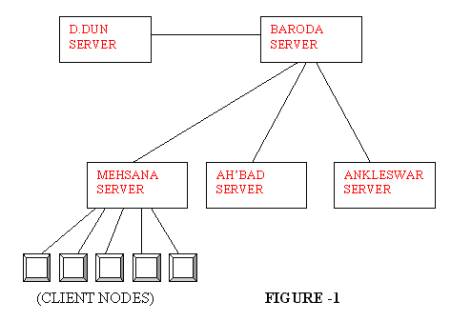
can be seen from the figure –1, only the client nodes connected at any project,
say Mehsana are able to access the IMMS database server in that project. At Mehsana for example, out of around 200
PCs installed in the project, only 64 nodes are able to access IMMS data, since
only these 64 nodes are connected to the IMMS database server network and are
configured for database access. Users
at these 64 nodes are also able to access the IMMS database only through the
Application package. Moreover, the
users cannot access servers of other projects, or at headquarters.
Similarly,
a vendor who might desire to know the status of a tender he had participated
(or) bagged a supply order is now not in a position to query the database
server, even though the required information is freely available and also not
confidential.
1.6
It is also noticed that amongst the users (indentors, MIS/
Top management) connected to IMMS, around 30-40% do not use IMMS actively for
access of information, since the access is only via the IMMS package – Reports
and Forms and these users are either not very comfortable working with
check-boxes, LOVs etc. buried amongst sub-menus/menus (or) they find the
learning process too time-consuming.
1.7
Web enabling of IMMS can solve all these problems, since the
Web Browsers are probably the most standardized and easiest to use software
available today. Any basic PC user is comfortable working with I.E., Netscape
Navigator or Opera. Web Browsers are also already installed and need no other
configuring at the client desktops.
2.0
WHAT IS WEB-ENABLING?
WWW-World
Wide Web is a collection of systems on the Internet that run software that
communicate using a common protocol.
Web-enabling an application basically implies a client, through a
browser interface, gets the required data in the form of HTML files, from a
web-server. Once the web pages are
designed and created on the web-server, any web-client (i.e., browser software)
can access these pages. The web server
can either be an Intranet server or an Internet server.
3.0
WHY WEB-ENABLING?
As
mentioned earlier, Web-enabling IMMS
·
Makes it easier to use for those users who need only DSS
part of IMMS.
·
Makes selective IMMS data available to any user who has
access to the web-server. If the web
server is Intranet, any non-IMMS user connected to the LAN can access the data
with no configuration/setup required on client desktop. If the web server is on Internet, anybody
can access the data.
4.0
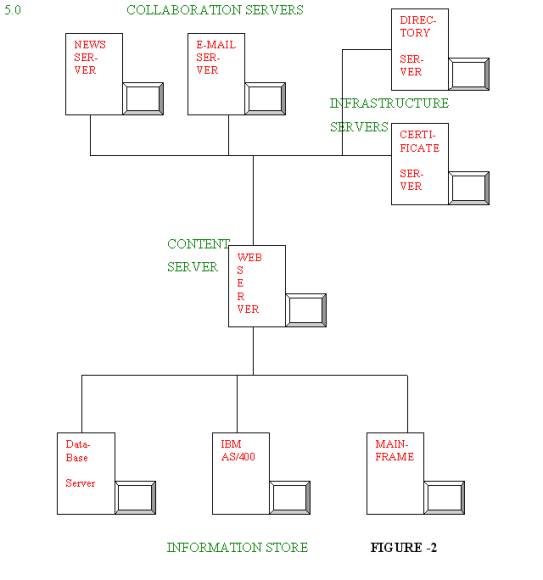
Figure -2 shows a general Intranet web publishing
setup. The proposed IMMS web-enabling
setup would eventually grow to the setup given in the figure-2. i.e., the
content server would host all types of web pages including employee
information, data from other database servers, etc.
5.1
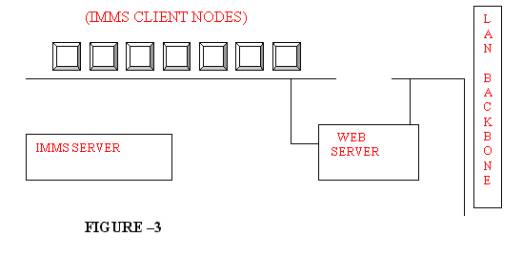
Proposed Initial Setup:
5.2
Proposed Initial Setup employs 3-tier web
application development.
5.3
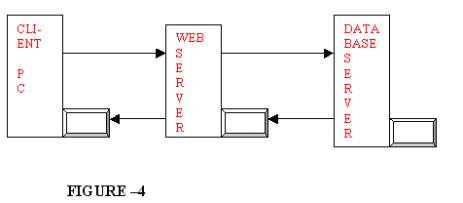
The web server loads the web page on the client
machine. The web page can be a simple
HTML document (or) a dynamic (DHTML) document.
The dynamic HTML is so-called because the HTML document is not a
static page stored in the web-server, but rather one that is created ‘on the
fly’ based on the action executed by the client.
Dynamic HTML may be implemented using many tools such as CGI
scripts (written in languages such as VBscript, JavaScript, PERL, C, C++, or
even UNIX shell script) or ASP (active server pages) or using Java servelets.
5.4
HOW
DHTML WORKS?
1. The
client fills out an HTML document containing the <FORM> element and
presses the submit button. This sends
the data the user entered to the web server.
2. The
web server receives the data and passes it to the program specified in the
ACTION attribute of the FORM element.
3. The
program (say Java servelets, as in this case) issues the command to the
database server, after establishing connection with it.
4. The
database server executes the command and returns the data back to the servelet
running on the web server.
5. The
servelet creates a new HTML document ‘on the fly’ with the data returned from
the database server and sends it back to the client.
5.4 WHY
JAVA SERVETS?
·
Java servelets are platform independent. So, portable
across different servers (Processor configurations/ operating systems)
·
Java servelets are more secure
·
Easier to maintain, debug and distribute.
·
Spawns fewer processes than CGI scripts.
·
Servelets runs entirely inside Java Virtual Machine
and does not depend on browser compatibility etc.
·
Servelets are able to tunnel through firewalls
using a servelet technology called HTTP tunneling, which enables the applet to
access objects that can be running almost anywhere on the network. So the application developed using Java
servelets initially on Intranet can be later on ported on Internet also, which
may be behind firewalls.
·
Almost all web servers available today support
servelets.
·
Java, being OOP language, objects/codes can be
re-used. Servelet-beans can be developed for distributed CORBA objects.
5.0
DATA
RETRIEVED FROM DATABASE:
Following data are retrieved from the IMMS database for the web
pages.
1. Reference
Book entries.
2. Material
balances.
3. Inventory
summary.
4. Status
of I.R.
5. Status
of Supply Orders.
6. Status
of Indents (STR 6) placed.
6.0 PROGRAM
METHODOLOGY USED:
Home Page is
created as static HTML from where the user is led to link pages corresponding
to the menu chosen. The link pages
employ Java applets for data validation so that the net connection is released
as soon as possible and data in improper format is not unnecessarily sent back
to server. Of course, Java applets have
a little overhead of delaying the downloading time of the web pages.
On user pressing the ‘submit’ button, the form details are sent
back to the web server, where the CGI program (Java servelets) makes the
connection to the database, queries the database for required information and
after getting the data, closes back the connection and the data is formatted and
submitted to the client in HTML.
6.0
SYSTEM
REQUIREMENTS:
HARDWARE:
Preferably a
separate web server; However, database server can also be used. For the
project, a Win NT machine has been used.
SOFTWARE:
Any web server compatible
with the underlying operating system can be used. Many free versions/evaluation copies of WINDOWS/ UNIX/ LINUX web
servers are freely available on the Net.
Win NT Apache Web
server is used for this project.
7.0
ACCESS
SPEED AND SECURITY ISSUES:
A very prevalent myth is so-called vulnerability
of machines connected to the Internet; it is often said and read that a
hacker/malicious user can literally ‘see’ inside your computer and
update/delete files at will.
However, the reality is that if proper ‘basic’
precautions are taken, data security of a machine connected to Internet is
never compromised and is as good or as bad as that of a standalone machine/
Intranet.
Let us look at the security walls in the
proposed setup.
·
The web server would access only the Http
port-service of the Database server; if the server is securely configured, no
hacking is possible.
·
A separate user is created in the Oracle
database, which has only ‘select’ (query) rights on only some selective tables
(objects) owned, by IMMS user. JDBC
connection is established only to this user, so the security of objects by IMMS
schema is not endangered.
·
Methods of Java servelets classes have
restrictions/inherent security features and are more robust and secure than CGI
scripts, which is improperly written, leave gaping security holes.
7.1 ACCESS
SPEEDS:
The serviceability of requests of a web server
depends on the configuration as also the design of application. The application
is tuned in following ways to increase the access speed.
·
Java servelets are initialized once and can
service any number of requests.
·
Servelets method uses JDBC connection pool to
create a pool of connections to the database.
This gives access to a collection of already opened database connections,
which will reduce the time it takes to service a request; also any number of
requests can be services at once.
·
Java applets validates the format of the data
inputted by user then and there; so, in addition to network traffic reduction,
redundant network connections are avoided.
8.0
FURTHER
IMPLEMENTATION STEPS:
The above design is very basic in design, servicing only IMMS
users and that too for a limited set of data; only query of database is
allowed.
This can grow either
·
Vertically Or
·
Horizontally.
By vertical growth, it is meant that this can be replaced by a
full-fledged e-business application where outside parties/ vendors can also
view/update/transact data. It is to be
understood that e-business is totally different from e-commerce and ‘electronic
data transfers’.
By horizontal
growth, it is meant that a full-fledged Intranet web server is developed at all
projects whose contents are not just IMMS data, but all MIS data currently
locked in various legacy systems. In
case it is desired that inter-project data transfers/access should also exist,
DNS service can be started and existing data channels could be used for
inter-connection.
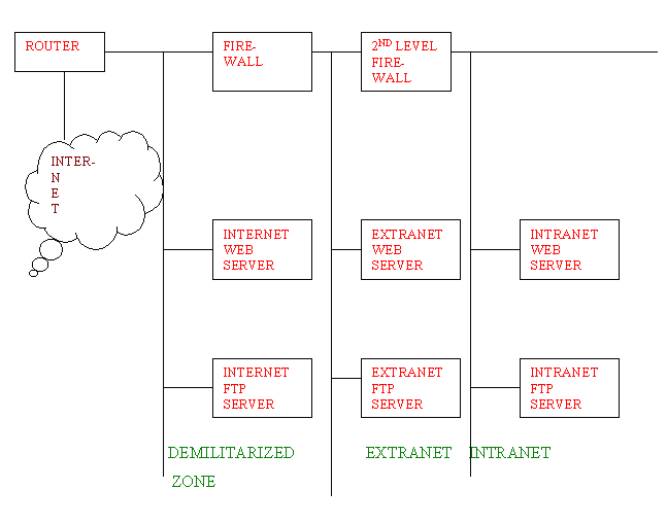
Following figure illustrates the additional
requirements in case the Intranet is linked to the Internet.
CONCLUSION:
Web enabling is the easiest and most
cost-effective way to disseminate information to the MIS users for DSS
Applications, as well as for conversion of legacy systems.
By implementing web-enabling
on Java which is portable, re-usable and above all freely available and
obsolete-proof (for at least the next 5 years!) web enabling applications need
only a handful of resources with existing hardware, existing network resources
and existing manpower. However. Certainly
training of existing in-house manpower for undertaking this task is essential
pre-requisite.