Control Panel
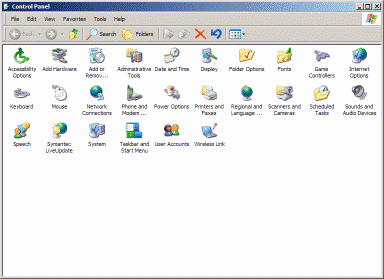
The Control Panel, accessed from the start menu or from Start - settings in some configurations, is the place that offers the user the opportunity to change most of the configuration settings of the PC. What follows, is a brief description of each icon displayed. Please note that the appearance of the window and the icons displayed will vary according to the operating system in use and its visual settings.
 Accessibility
Options
Accessibility
Options
The intended purpose of this applet is to configure windows settings, to make it easier for users with motion, visual, and hearing disabilities. However the settings available can be useful to many other users. It offers the ability to control keyboard, mouse, sound and display settings.
 Add
Remove Hardware
Add
Remove Hardware
This applet provides a wizard for adding, removing or troubleshooting hardware devices.
 Add
Remove Programs
Add
Remove Programs
This is the applet you should use to uninstall programs that you no longer want. You can also add or remove components of the windows operating system. In Windows 98 or ME, this is also the place to create bootable floppy disks.
 Administrative
Tools (win XP only)
Administrative
Tools (win XP only)
This applet offers the ability to change many system level settings, such as the programs that run at boot up. Extreme caution is required here as altering a setting can have systemwide ramifications. Unless you know exactly what you are doing, it is best to leave this one alone.
 Date
And Time
Date
And Time
As the name implies, this applet controls the clock settings, and time zone.
 Display
This applet gives you access to the display settings. You can change the Desktop picture, Screensaver, Themes, General window appearance (color and font sizes etc) and also the screen resolution.
 Folder
Options
Folder
Options
This applet gives you the ability to change the way a folder looks when open. For example the files contained in a folder can be displayed as icons or shown as a list with details displayed. Toolbars can be removed or added. File display settings can be changed, for example, you can choose wether or not to display hidden system files, or what other details will be visible. Also, under the File Types tab, you can see and alter which files are opened by which program.
 Fonts
Fonts
This applet gives you a view of all the fonts on your PC. This is where you go to install new fonts. To do this go to the menu bar and click File - install new font.
 Game
controllers
Game
controllers
This applet controls the game controllers (joysticks etc), installed on your system. Go here if you are having problems with game hardware.
 Internet
options
Internet
options
This applet gives you the ability to change your internet settings. You can go here to delete cookies, temporary internet files and history files. Use caution here as changing settings incorrectly may prevent access to the internet or limit available functions.
 Keyboard
This applet controls keyboard functions. You can configure key repeat rate etc.
 Mouse
Mouse
This applet controls keyboard functions. Actual options will vary depending on the type of mouse installed, but generally you can change the mouse speed, Left or right hand function, and general button functions.
 Network
Connections
Network
Connections
This will display all the network and internet connections on your PC.
 Phone
and Modem
Phone
and Modem
This displays installed settings for phone and modem. Drivers can be removed or changed.
 Power
Options
Power
Options
Displays And allows you to change power save settings.
 Printers
and Faxes
Printers
and Faxes
Displays Printers and Faxes installed. Devices can be added or removed here.
 Regional
and Languages
Regional
and Languages
Allows you to change regional settings, such as language, Currency and time format display.
 Scanner
and Cameras
Scanner
and Cameras
Displays Devices installed and allows you to add or remove devices.
 Scheduled
tasks
Scheduled
tasks
Allows you to configure automatic actions such as Defragment etc.
 Sounds
and Audio devices
Sounds
and Audio devices
Allows you to change default windows sounds and to configure all audio recording and playback devices.
 Speech
Allows you to configure text to speech settings.
 System
Gives you access to many system settings such as System Restore, User profiles, Performance settings. Also lists all device drivers and Hardware components. Shows Operating system version, Processor type and Memory information.
 Taskbar
and start menu
Taskbar
and start menu
Allows you to configure Taskbar and start menu settings.
 User
Accounts
User
Accounts
Allows you to view and edit user accounts, logon Icons etc.
 Wireless
Link
Wireless
Link
Displays configuration of infra red devices and gives you the ability to troubleshoot in the event of a problem.