Digital Imaging
Film From Files (Pg 3) Portrait vs. Landscape
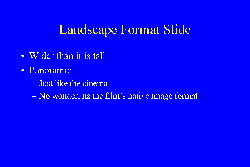
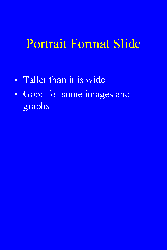
You are probably familiar with portrait and landscape format printing. When 35 mm film is shot in a camera, it is ALWAYS shot in landscape format. When you want a portrait shot you tilt the camera 90 degrees and snap the picture, but the image on the film is still in landscape format, it is just sideways. Electronic film recorders make digital images on film by making an image that is snapped by a camera. They always make landscape format images.
|
|
Landscape |
Portrait |
width=11.25" height=7.5" |
width=7.5" height=11.25" |
How the above images actually look when properly oriented on film:
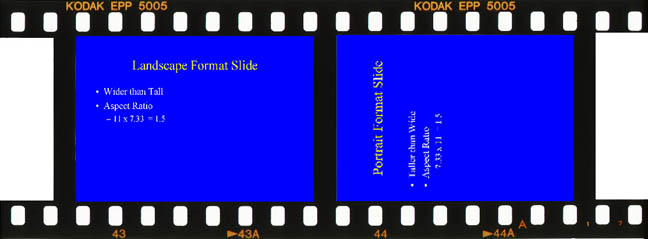
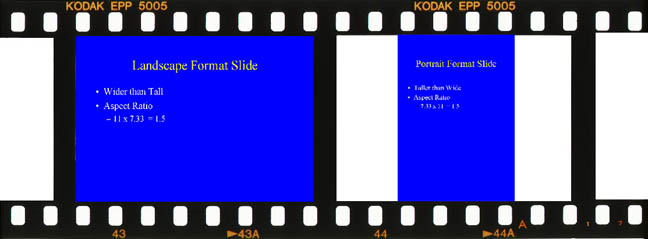
What this means is that the images you send to be recorded onto film must take into account the mechanics of what will happen. The image will be shot in landscape format - so send it in landscape format. When you are finished editing your image rotate it 90 degrees if necessary and save it. If you don't rotate all images into landscape view you might get something that looks like:
If you are using PowerPointTM to make slides, then the page setup you specify will take care of orienting the slide properly on the film recorder (as long as you select 35mm). This is because PowerPointTM files are sent to the film recorder through a rasterization program which has been customized for them. PowerPointTM files almost always contain multiple slides, therefore multiple images. Most other file formats only contain one image.
Other file formats are sent to the film recorder in the orientation encoded in their native format. So, if you have a .JPG, .TIF, .PSD, or other type of file of only one image, you must take into account the orientation and aspect ratio of the film.
The aspect ratio is the ratio of the height over the width. 35mm film has an aspect ratio of 1.5 to 1 in portrait orientation and 1 to 1.5 in landscape orientation. In landscape format the width is larger than the height and in portrait the height is larger than the width. For 35mm film that means the image area is 1.5 times wider than it is tall. If the image is oriented in portrait format then it is 1.5 times taller than it is wide. Regular letter paper is 8.5 x 11 inches and has an aspect ratio of 1.3 to 1.
When you have an image you want to put onto 35mm film, it must have an aspect ratio of 1.5 in order to fill the frame. If you try to shoot an image that does not have an aspect ratio of 1.5 then one of two things will occur: The image will either be scaled so that it fits into the frame along one dimension and leave some portion of the frame blank, or the image will be cropped and some of it cut off such that it fills the frame entirely. (click here for an example)
Scale factor
Some people don't realize that a pixel is a pixel and that the scale factor only determines how big each pixel is. The scale factor tells us how many pixels there are in an inch on our final display medium (pixels per inch - ppi). For example:
| pixels | scale factor (ppi) | aspect ratio | image size (inches) |
792 x 528 |
72 |
1.5 |
11 x 7.33 |
792 x 528 |
132 |
1.5 |
6 x 4 |
3300 x 2200 |
300 |
1.5 |
11 x 7.33 |
As a rule; the more pixels there are in an image, the more resolution that image will have. The film recorder will scale an image so that at least one edge will fill the frame. If the aspect ratio is 1.5 then the entire image will fill the frame if it is oriented correctly (landscape). The maximum resolving power of good 35mm film is somewhere between 3000 and 4000 lines. The usual setting for the film recorder is 4000 lines per image on 35mm film.