VB Assignment Set 2 - Review
Things you need to know to complete this programming assignment set :
- Create the interface for the program below to
calculate the volume of a cylinder. Be sure to rename all controls and
set all properties before entering any code. Add comments to the
general declarations section of the form.
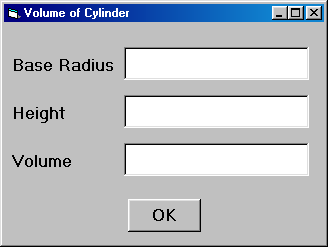
- In the General declarations section of the form, declare variables
for the radius, height and volume. (That is, sRadius, sHeight, and
sVolume). Declare a constant for Pi. (Remember a Constant will never change)
- Double click on the OK button and enter the codes
between Private Sub cmdOk_Click( ) and End Sub. Use the names of the
variable you used in the General declaration section.
Private Sub cmdOk_Click( )
sRadius = Val(txtRadius.Text)
sHeight = Val(txtHeight.Text)
sVolume = sPi * (sRadius ^ 2) * sHeight
txtVolume.Text= sVolume
End Sub
- Create
a new folder in your directory called ICS3M
Assignment Set 2
-
Create a new folder called Assign 2A
-
Save
the project and form as carroll_ics_assign2a_yourname
-
Run the program and correct any errors, and resave.
- Follow the steps below to create a program that calculates the Area of a
rectangle.
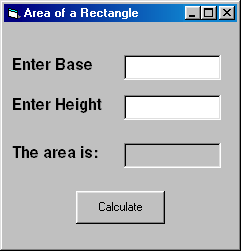
- Add two textboxes, four labels, and one command button to a form.
- Change the Caption property of the 1st label to Enter Base, the
2nd label to Enter Height & the 3rd to The area is:
- Delete the text from the Text property of both textboxes and the other
4th label.
- Change the border style of the 4th label to Fixed Single.
- Make the two text boxes and the 4th label the same size by selecting
all 3 and choosing Format --> Make Same Size --> Both
- Change the Caption property of the command button to Calculate.
- Centre the command button by selecting it and choosing Format
--> Center in Form --> Horizontally
- Change the Name property of the 1st text box to txtBase,
the 2nd text box to txtHeight , the 4th label to lblArea and the command button to cmdCalculate.
- Double-click on the command button to enter code for the click event.
Remeber to use the Val ( ) function to convert a string to its numeric equivalent.
- You will need to declare 3 variables. You will need variables for the
s Area, s
Base, sHeight as Single
- The area of a rectangle is the base * height.
-
Create a new folder called Assign 2B
- Save the form and the project as
carroll_ics_assign2b_yourname
- Write a program that converts any number of days into hours. All
values should be entered in textboxes and then stored in variables to
be used in calculations. The output should be in a separate label and a
command button should cause the calculation. Create a new folder called Assign
2C. Save the form and the project as carroll_ics_assign2c_yourname.
- Using the following form as a guide, create a program to convert distance
measurements between the imperial & metric systems.
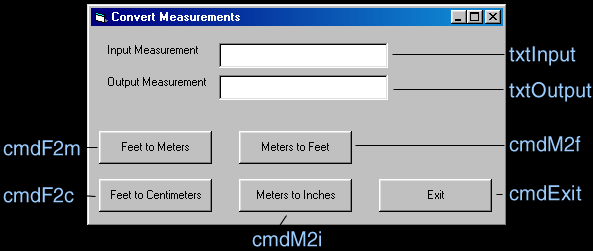
- Make the caption of the form Convert Measurements.
- Name the form, frmMHS
- Use the IsNumeric ( ) function to ensure that someone does not incorrectly include
alphabetical characters within the input text box to prevent run-time errors.
- Include the following objects: 2 labels, 2 text boxes, and 5 command
buttons. Name them as outlined above. The labels do not need to be named as
they are not referred to in the code.
- Consider the look of your form. Make sure the controls are aligned and
distributed neatly. Make any necessary changes.
- Double Click on each command button to write the code that will convert
each measurement or in the case of the Exit command button, exit the
program.
- When any of the conversion command buttons is pressed, always set the
focus back to the input box. Do this by writing txtInput.SetFocus within
each command button's sub-routine.
- Declare a variable in the General Declarations section called sOutput
to store the output measurement. Use single data type.
- Format the data in the Output text box using the Format
( ) function. Use the predefined format that will format the value with
two digits to the right of the decimal point; displays 0 to the left of
decimal if the value is less than one and does not use commas for thousands.
- Remember, in order to convert string values to numerical values you will
need to use the Val ( ) function.
- Use the following to help figure out your conversion calculations: 1 foot
= 0.3048 meter, 1 meter = 100cm, 1 foot = 12 inches.
-
Create a new folder called Assign 2D
- Save the form and the project as carroll_ics_assign2d_yourname.
- Write a program that will prompt the user for a password and
then displays a msg box congratulating them if they submitted the correct
password or informing them that access is denied.
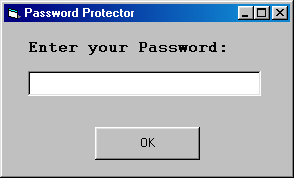
- Add a textbox, a label, and a command button to a form.
- Change the Caption property of the 1st label to Enter your
Password:
- Delete the text from the Text property of the textbox.
- Change the Caption property of the command button to OK.
- Change the Name property of the text box to txtPassword, and the command button to
cmdOk.
- Double-click on the command button to enter code for the click event.
- If the user enters the correct password "joecool" then
display a message box that congratulates them, otherwise display a
message
box that informs them that access is denied.
- You will need to use an If statement to determine if the user's password is
correct or not.
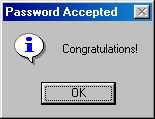
- The code for the congratulatory message box is : MsgBox "Congratulations!", vbInformation, "Password Accepted"
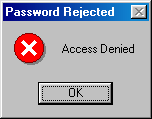
- The code for the access denied message box is : MsgBox "Access Denied", vbCritical, "Password Rejected"
- To include additional functionality, make it so asterixes (****)
appear in the text box instead of what the user actually types. To do
this, assign the PasswordChar property of the text box to ASCII
character 42. For example, txtPassword.PasswordChar = Chr(42) or
while in break mode, simply select the text box and place an asterix (*)
in the PasswordChar property of the text box.
- To include additional functionality, allow the user the option of
changing their password.
-
Create a new folder called Assign 2E
- Save the form and the project as
carroll_ics_assign2e_yourname
Unless otherwise noted all programming assignments will be evaluated based on
the following rubric.