
CENTURION
Centurion: Defender of
Although
the 16bit graphics and sound effects can't even be compared to most modern
games, the game can be played on almost any computer, and it barely takes up
any hard drive space (around a MB). If you would like to play the game, but you
don't have it, you can download it here. It works on MS-Dos, so for the latest
versions of Windows and other OS, you should need a MS-Dos emulator such as
DOSBox (look for it at the donwload area).
The game
begins in 275 b.c. with you in control of

BEGINNER TIPS
¿Need
a little help? This section will explain some of the basic gameplay mechanics.
This is the map at the beginning of the game: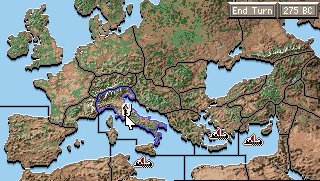 :
:
At
the top right of the screen, there's two buttons. "End Turn" ends
your turn (as the name implies :). This is an important function because you
can only move your legions and fleets once per year (turn).
The
other button (the one that displays the current year) opens a menu in which you
can save/load games, change the difficulty level (I recommend playing the game
on Legionary, the default difficulty, Gallery Slave is just too easy),
and exit to DOS.
The
map is divided into smaller chunks. Each chunk is a province (there's 25
overall). You control the provinces with a blue outline (for now only Italia).
There are also different sections of sea, fleets can only move from one space
to another each turn. In the seas, you can see three red boats, those are enemy
fleets. If you click on one, you can see what province it's from.
In
Italia, you'll see a soldier  , that soldier represents one legion. If you right click it, you'll see
several "shadow" legions in the surrounding provinces; those are the
areas to which you can deploy your legion. Click on any of this and your legion
will move there. First your scouts will tell you a little about the province,
and you'll start a conversation with the local leaders. You can try to get them
to join you peacefully through an alliance. However, due to your small empire
and rather wimpy army, you'll most likely fail, forcing you to Withdraw (this
will move your Legion back to Italia, or wherever it came from). Or, you can Go
to War and meet the enemy troops on the battlefield. Select a Formation and a
Tactic, and the battle will begin. If you
win, that province will be under your control.
, that soldier represents one legion. If you right click it, you'll see
several "shadow" legions in the surrounding provinces; those are the
areas to which you can deploy your legion. Click on any of this and your legion
will move there. First your scouts will tell you a little about the province,
and you'll start a conversation with the local leaders. You can try to get them
to join you peacefully through an alliance. However, due to your small empire
and rather wimpy army, you'll most likely fail, forcing you to Withdraw (this
will move your Legion back to Italia, or wherever it came from). Or, you can Go
to War and meet the enemy troops on the battlefield. Select a Formation and a
Tactic, and the battle will begin. If you
win, that province will be under your control.
If
you left click one of your provinces, you'll see the following menu. 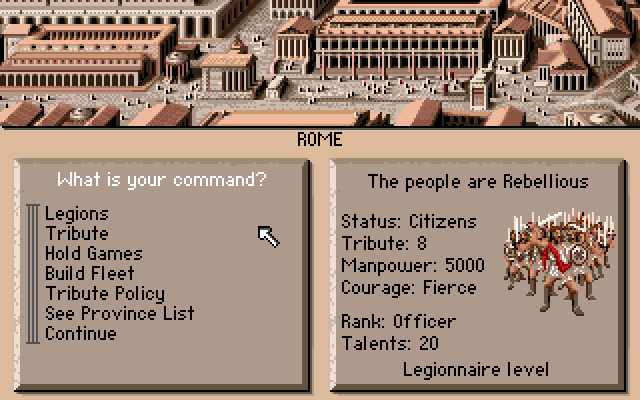
On
the left side of the screen, you can access various options.
-Legion:
Your Legions' status.
-Tributes:
This option allows you to set the amount of taxes for this colony (tributes are
your main source of income).
-Hold Games: Hold games to increase the
Province's moral.
-Buid
Fleet: You can only build a fleet in provinces with
a coast, and only if you are a Tribune (rank) or
higher.
-Tribute
Policy: Only in Italia, this option allows you to select the tribute level for all your provinces.
-
-Continue:
Takes you back to the map.
On
the right side of the screen, you'll see the people's morale ("The people
are..."), their status (in the above screenshot it's Citizen, which is the
highest level), the amount of tribute you receive from them each year, the
amount of soldiers you can enlist in your armies (manpower), and their courage. I recommend you visit the legions page to learn a little more about the latter
two points. And, on the bottom you'll see your rank
(you probably have the lowest right now) and the money currently at your
disposition (in talents).
Well,
I believe I've explained the most important gameplay mechanics in Centurion.
Good luck! Use the menu on the left to get more in-depth info on the game.
Also, you can download a manual from the game (no images): manual-centurion-english.doc (22 pages,157 kb)
http://www.oocities.org/rod_centurion
This
English translation has been gently made by Mitchell Frizzell