// 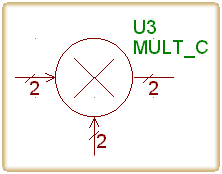
// MULT_C.DF
// Sim+ : Writing Block Definition Files
Defining blocks for use with Sim+ comprises of two parts: One is creating the graphic symbol that will appear on the computer screen and in block diagram printouts, this is done with the EDA package library editor and is not covered in this page. The other is defining the behavior of the particular block, blocks' behavior is defined in a 'block definition file'. This chapter explains how to create block definition files.
%%Inputs
type NAME
:
type NAME
%%Outputs
type NAME dependency_list
:
type NAME dependency_list
%%StateVars
type NAME
:
type NAME
%%Initialization
initialization_code
%%OutputEquations
NAME=rvalue
:
NAME=rvalue
%%StateEquations
state_equations_code
%%Termination
termination_cade
%%End
back to top of page
type
Type may be any C/C++ primitive type, or typedef'ed type. Sim+ does not allow white spaces
in types, therefore 'char *' is not a legal type in Sim+ block definition file, although
it is in C. (however char* is legal). examples for legal types:
int, double, char[15].
NAME
Names must begin with an alphabetical [a-zA-Z] character, the first character may be
followed by any sequence of alphanumeric and/or underscore (_) characters. letter case is
significant. examples for legal names :
x1, xx, X1r, Z_1
Note: even though mixed-case naming is allowed in Sim+, it is not recommended - many
EDA packages force pin names to be either all-higher or all-lower case names. You should
check how the EDA package you are using behaves and act accordingly.
The three packages mentioned all work well with all-higher case names, therefore block
definition files included in the Sim+ distribution use higher case names.
dependency_list
Each output declaration should include a list of input names it value depends on.
The list should contain only the names of inputs that output value depends on in the
current iteration, in other words - all (and only) the input names that appear in the rvalue
of the output equation of that particular output.
The dependency list may be empty, but must have the parentheses. example for complete
output declaration lines:
double Z (X,Y)
int K ()
Note: incorrect dependency list in some cases would not be captured by the Sim+ translator, and will probably cause the generated code to be erroneous.
initialization_code
Free C/C++ code, including /* ... */ comments etc. the end of initialization code section
is detected by the %%OutputEquations line.
Sim+ will not skip the %%OutputEquations line even if it is surrounded by 'C'
/*...*/ comment delimiters - as long as the 'double-percent' pair start in column zero.
rvalue
Any valid one-line C expression, without the terminating semicolon (;). Sim+ also
allows for multiple-line rvalues, using backslash (\) as a continuation character, similar
to the way it is used in C language #define directive.
state_equations_code
, termination_code
Similar to initialization_code.
end of line comments
C++ style end-of-line comments are allowed anywhere in the file
back to top of page
This is how the translator looks for block definition files -
Example: if a block is named mult_r, and the following DFPATH line exists in the
configuration file-
DFPATH=c:\simplus\df;df
Then the translator will first search for a file named 'mult_r.df' in c:\simplus\df, if it does not exist there, it will be looked for in a 'df' subdirectory under the current working directory, and if it will not be found there, the translator will give an error message and abort.
back to top of page
//
// MULT_C.DF
//
%%Inputs

  complex X

  complex Y
%%Outputs

  complex Z (X,Y)
%%StateVars
%%OutputEquations

  Z = (X*Y)
%%Initialization
%%Termination
%%StateEquations
%%End
back to top of page
//
// INTEG_R.DF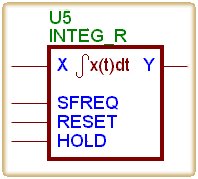
//
%%Inputs

  double X

  double SFREQ

  double RESET

  double HOLD
%%Outputs

  double Y (X,SFREQ,RESET,HOLD)
%%StateVars

  double pY
%%Initialization

  pY = 0.0;
%%OutputEquations

  Y = ( RESET>0.0 ? 0.0 : ( HOLD>0.0 ? pY : pY+X/SFREQ ) )
%%StateEquations

  if(RESET>0.0) pY=0.0;

  else{

    if(!(HOLD>0.0)) pY += X/SFREQ;

  }
%%Termination
%%End
[abSim] [Sim+] [Examples] [Download] [Feedback]
This page is hosted by 
updated: Jan 16, 1998.