
Introduction
 Introduction
 |
 Computer
 |
 Cabinet
 |
 Monitor
 |
 Control Panel
 |
 Finishing Touches
 |
 Final
Product
Final
Product |
 Costs
Costs |
 Credit
& Thanks
Credit
& Thanks |
 Useful Links
 |
|
Future
Enhancements |
| Questions? Feel free to e-mail me. |
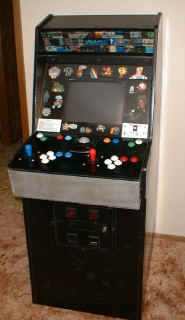
Being a teenager in the 80's, it was difficult growing up without going to (and sometimes living at) arcades. Games, it seemed, were everywhere you went. Restaurants, shopping malls, grocery stores, theme parks, bowling alleys; heck, even camping grounds had them! Needless to say, I have spent more than my fair share of time (and quarters) playing Space Invaders, Pac-Man, Donkey Kong, Galaga, Gorf, Tron, Dragon's Lair, Frogger, Time Pilot, etc… Then a couple of years ago, I ran across this great little program called MAME. If you're into video games at all, then you have undoubtedly heard about this gem! It allows you to play all these original classics on your PC - no quarters required! No, they're not some cheap knock-off reproductions…these are the actual games. If you had a pattern you used to use at the arcade, rest assured it will work the same! A couple months after I initially found the program, I kind of lost interest. Then, during the summer of 1999 I decided to check out what had changed in the program since 1997. Was I surprised to see the number of games available and stability of MAME had increased dramatically. Needless to say, I've been hooked ever since. It was right about this time I started thinking how cool it would be to have a real arcade cabinet, with real arcade controls to play all of these. After doing a little searching on the Internet, I was amazed at the number of people who had the same idea as me, but had actually DONE it! I was also surprised to get the go-ahead from my wife to do this without much resistance. As long as I didn't spend too much $$$, she was OK with it. Thanks, babe!
Now I could finally get serious about this project. Let the research begin! I checked a ton of sites to get a good idea of exactly what I'd need to do this properly. There were so many different designs, layouts and configurations that I had some serious choices to make. I knew that I wanted to keep the cost somewhat low, and at the same time wanted something that would last for a long time and look nice in the rec room. I have some electronics "skills", but they are pretty limited, so I based some of my decisions around this. My basic requirements were this:
- Wanted a stand alone unit using a separate PC fast enough to play the classics and most of the more advanced games in Win98.
- Would use a PC monitor for cost and ease of installation
- Wanted an original arcade cabinet to convert
- 2 players with 6 buttons each
- Trackball
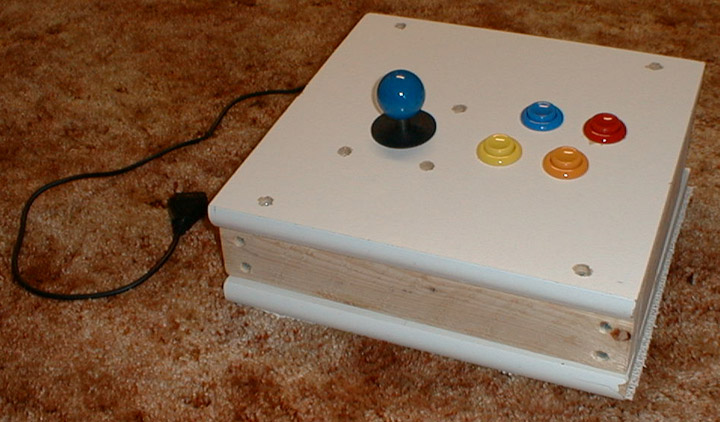
First, I purchased a PC and got all the parts in. Being in a rush to try out the real arcade control feel, I put together this joystick by hacking into a $1.99 joystick from CompUSA. The blue joystick used in this was eventually transferred into my cabinet, so this joystick is no more...
 |


