Page 1 Page 2 Page 3 Page 4 Page 5
Working with Font Sizes
So, let’s look at another HTML tag that’s not too hard to learn. The FONT tag, it has only three parts and each is quite logical. You see there are only three things you can do to a font in HTML, (and there is no real order for these either).
• First, you can tell the browser to change the Size of the Font.
• Second, you can tell the browser to change the Color of the Font.
• And finally, third, you can tell the browser to change the Face of the Font.
Face refers to the name of the Font, and there are thousands of Font faces in the world but not every computer has the same list of Fonts. So we have to be careful.
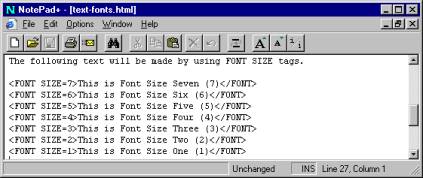
I’m going to tackle the Size attribute first. There are seven (7) sizes allowed and it is totally different from the Heading sizes just discussed. Font size can be as large as size seven (7) and as small as size (1). You will notice immediately, some of the differences as soon as you look at the screen shots below.
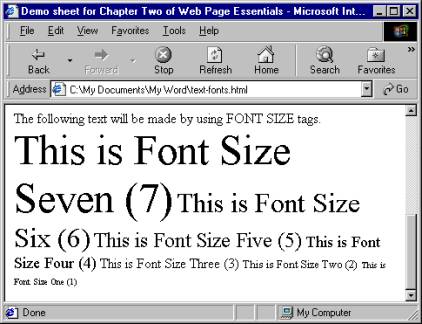
Please notice that HTML treats the Font tag quite differently. First of all it doesn’t have a built-in paragraph tag. You can have several sizes of text on one line. Another noticeable item is that Font size seven (7) is larger than the Heading size 6. So we can make text a bit larger if we so desire. (More information on text sizes later in this chapter). To make the text appearing in the example on the left live on separate lines for each size, I would have to place a Break < br /> or < P > paragraph tag at the end of each of the coded lines in the HTML code.
Page 1 Page 2 Page 3 Page 4 Page 5 TOP