pretty cool but it won’t show on your computer at all. But, have no fear there are ways!
Page 1 Page 2 Page 3 Page 4 Page 5
Working with Font Faces
(Note: If you are reading this document as a printed page, then the font face is a Serif font called Times New Roman. If you are viewing this online, then the font face is a Sans-Serif font called Verdana.)
As I stated above there are many Font Faces to deal with, but there are only a few we should be concerned with. Some of the Faces are like the type of text I’m using in this written page.
This is a Serif font and is the quite popular Times New Roman, you can expect all Windows computers to have this Font, other systems might call it Times or Times Roman, but it will all pretty much look the same.
There is another style of Font Face that is considered Sans-Serif and is the other popular style called Arial or in a MAC called Helvetica.
And, the last to concern yourself with might be one that is cursive or one that looks like handwriting or hand printed. Sometimes we use a Font Face that is called Comic Sans MS to impart a more casual look.
But please note, if you have a lot of fancy fonts on your computer, you cannot expect that other people will have the same fancy fonts on their computer. So there goes all your planning for that special look to the text of your Web page. You better stick with the common type of Fonts and be safe.
Here’s an example of a Font Face I own that would not be on your computer. This is called pretty cool but it won’t show on your computer at all. But, have no fear there are ways!
Let’s review some of the Font Faces that should be considered available on anyone’s computer.
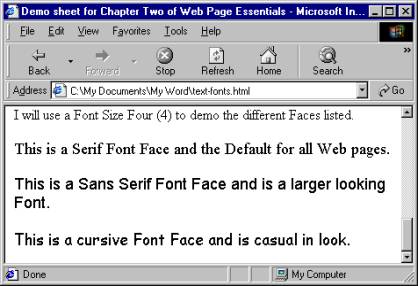
Feel free to experiment with the different Font Faces you know that are loaded on your computer. Just be fair warned that not everyone has that very special font loaded on his or her computer and the browser will try to match your request the best it knows how. If all fails, don’t worry, the browser will just load the default Times New Roman in the place of your exotic Font Face.
Page 1 Page 2 Page 3 Page 4 Page 5 TOP