BASA logoBASA WAVECAMP
  SUA FILES
Special Use Airspace

Accomodations

Chamber Ride

Oxygen Equipment

Barographs/Badges

Clothing Tips

PASCO Wavecamp Brochure

Reno Airspace

Minden Wave Windows

SUA file

Participants List

During the 2005 BASA wavecamp we had some violations of the wave windows, which were observed by Oakland ARTCC.
We have to improve on that .
Both for
  • the safety of others and ourselves. You wouldn't want to have a close encounter with one of the big boys.
  • the safeguarding of our priviliges of having Wave Windows to be able to ascend into Class A airspace.
             

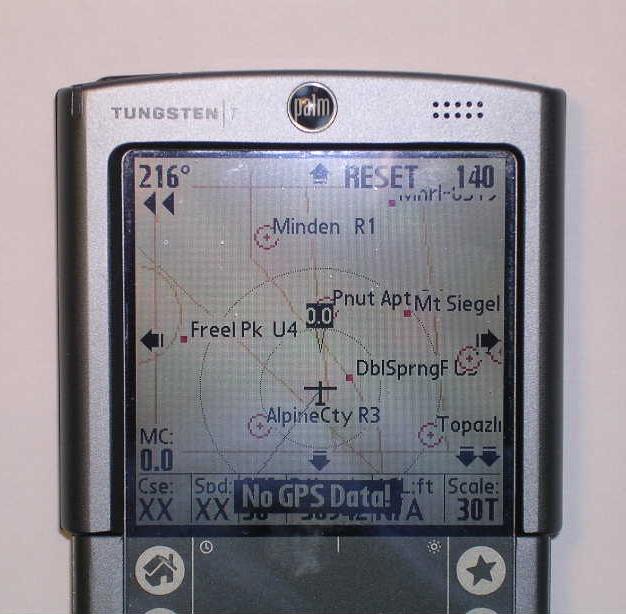
Minden Wave WindowsMinden Wave Windows on Palm PDA by Hans Van Weersch
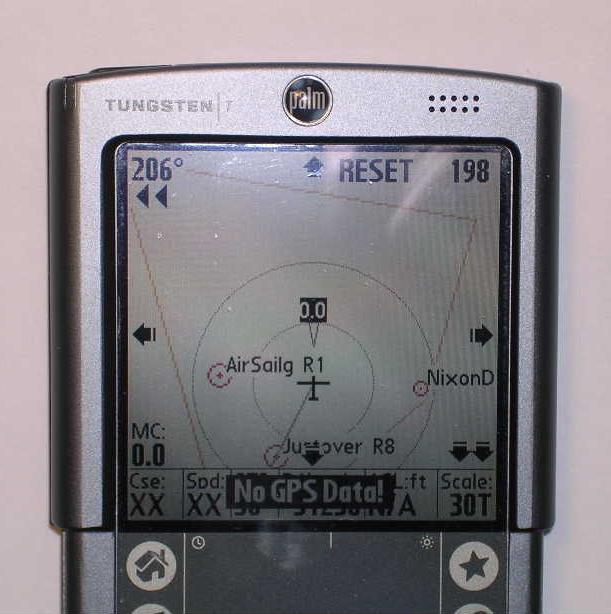
I have created a new SUA file that includes the Minden and AirSailing Wave Windows.

You can download this SUA file here.     (left click to view, right click to download)

The name of the file is CA_NV_SUA.txt.
This is an ordinary text file which you can edit with any text editor as needed.
The file is in the Tim Newport-Peace format.
For the PDA Flight Computer SW that I am using (SoarPilot on the Palm OS), I just need to rename the file into suadata.sua and put it into the approriate directory on the Palm.
Your flight computer might require a different naming convention. (See below for WinPilot and SeeYou)


This file covers California and Nevada. It is build from the different SUA area files as available from the Turnpoint Exchange.
  • TRUCKEE                            TRCK303C.SUA   
  • HOLLISTER                         HOLLSTR6.SUA  
  • WILLIAMS                          WSC2006B.SUA   
  • AVENAL                              AVENAL03.SUA  
  • CAL CITY                            CAL_CITY.SUA  
Apart from the FAA defined Special Use Airspace, this file also contains.

Wave Windows:AirSailing Wave Window on Palm PDA by Hans Van Weersch
Land Marks:                               (courtesy Gary Evans)
  • Nevada Border
  • Highway NV 6
  • Highway NV 15
  • Highway NV 50
  • Highway NV 80
  • Highway NV 93
  • Highway NV 95
  • Highway NV 95-1
  • Highway NV 95-2
  • Highway NV 120
  • Highway NV 278
  • Highway NV 305
  • Highway NV 376
  • Highway NV 395


WinPilot and SeeYou
Darryl Ramm created the following writeup for the SeeYou and WinPilot users.

SeeYou Mobile
SeeYou Mobile supports only one airspace .cub file. This file is in a binary format and you can’t manually add airspace to the file. 
However the wave window is easily added to a .cub file through the desktop SeeYou program.

In SeeYou (desktop not Mobile) select Tools>Airspace, in the Airspace dialog box click on the “Add” button.
Browse for the “MindenWave.txt” (or "ASIWave.txt") file.
You can bring up a map in SeeYou to check the wave window appears as it should. Now use the Mobile Wizard in SeeYou to update your PDA.

The wave windows show up as “Glider Sector” airspace so you need to make sure that the “Glider Sector” check box is checked in SeeYou desktop in the
Tools>Airspace settings and in SeeYou Mobile in the Menu>Settings>Airspace dialog.
As the wave windows are so important I usually set SeeYou to show the windows with a transparent color fill to stand out even more.

For flying in the Minden area in addition to the wave window files you will need a local waypoint file.
I would recommend using the SeeYou format (.cup) Truckee turnpoint file from the soaring turnpoint exchange or Jonathan Hughes’ “points.cup” turnpoint file.
This is an aggregate of Truckee, Hollister and other turnpoint data.

WinPilot

WinPilot directly supports adding one or more files in open airspace format. 
Copy the MindenWave.txt and/or ASIWave.txt files to a location on your PDA that WinPilot will find it –
this needs to be either the WinPilot directory (default of My Documents) or the top level directory of the SD memory card.
In WinPilot go to Menu>Files and click on the Additional Airspace […] button select “MindenWave.txt” (or "ASIWave.txt").
Click the up arrow button and then the OK button.

For flying in the Minden area in addition to the wave window files you will need local waypoints.
For the Minden area with WinPilot I use the WinPilot formatted turnpoint file for Truckee.

Downloads

download the POINTS.CUP file   (rename from point.cup.txt to points.cup after download).
download the MindenWave.txt file for SeeYou and WinPilot.
download the ASIWave.txt file for SeeYou and WinPilot.


Transponder squawk code

Keep in mind that in the Reno area you need to use 0440 as transponder squawk code.


Go to the soaring webpages of Hans Van Weersch