

Fanbus for Dummies: Part 3
Connect the Molex:
Now, bring out that molex connector that you sniped off your fan. On the molex, you'll see that there are 4 color wires going into the connector. Two of them carry
power, one of them is a ground and the other i dont know what the fuck it's for...maybe just fer looks.
The 2 important ones that you have to pay attention to is the yellow wire and the black wire (the one next to the yellow, since there are two).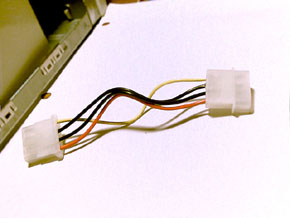
What you want to do is push the pins of these two colors out from the male end. Leave the others intact. Here's the important part: the black (white) wire on your fanbus will be connected/soldered to the black connector on the molex. The red wire will be connected/soldered to the yellow on the molex. Do not get this part mixed up, it can damage your fans or computer even.
You are now pretty much done. But before you test it, go over every single wire that you soldered/connected together and check to see if everything is right and still
intact. Trust me on this, upon checking my connection after i was done, i found a few wires broke away from the spring clip's prongs and have to re-soldered them. So check to make sure.
 After you've checked, it's now time to fire it up and see
what happens. Go ahead and plug the molex into your PC and connect some fans to the fanbus. Test out all the terminals and make sure have power, if some of them dont, then you have to go back and check your
connectivity between the wires and the spring clip prongs. Here is a pic of my fanbus on it's first test run. I've connected 2 fans to it here and they are both running right now.
After you've checked, it's now time to fire it up and see
what happens. Go ahead and plug the molex into your PC and connect some fans to the fanbus. Test out all the terminals and make sure have power, if some of them dont, then you have to go back and check your
connectivity between the wires and the spring clip prongs. Here is a pic of my fanbus on it's first test run. I've connected 2 fans to it here and they are both running right now.
Good luck with your project, if you have any questions, dont hesitate to ICQ me or post a question on the forum.
Total time spent: 2.5 hours
Total $ spent: about $25US
< Part 2: Take me Back

|














Related Links |

